The Qeemat Punjab App is an official Punjab government app that lets you check the daily prices of fruits, vegetables, and essential items set by the Deputy Commissioner (DC). If a shop charges more than the official rate, you can file a complaint directly through the app, and it is routed to the Price Control Magistrate for that area . The app is developed by the Punjab Information Technology Board (PITB) and is free to download . This guide explains how to set it up, how the complaint system works, and what to do if the app is not working.
What the App Actually Does
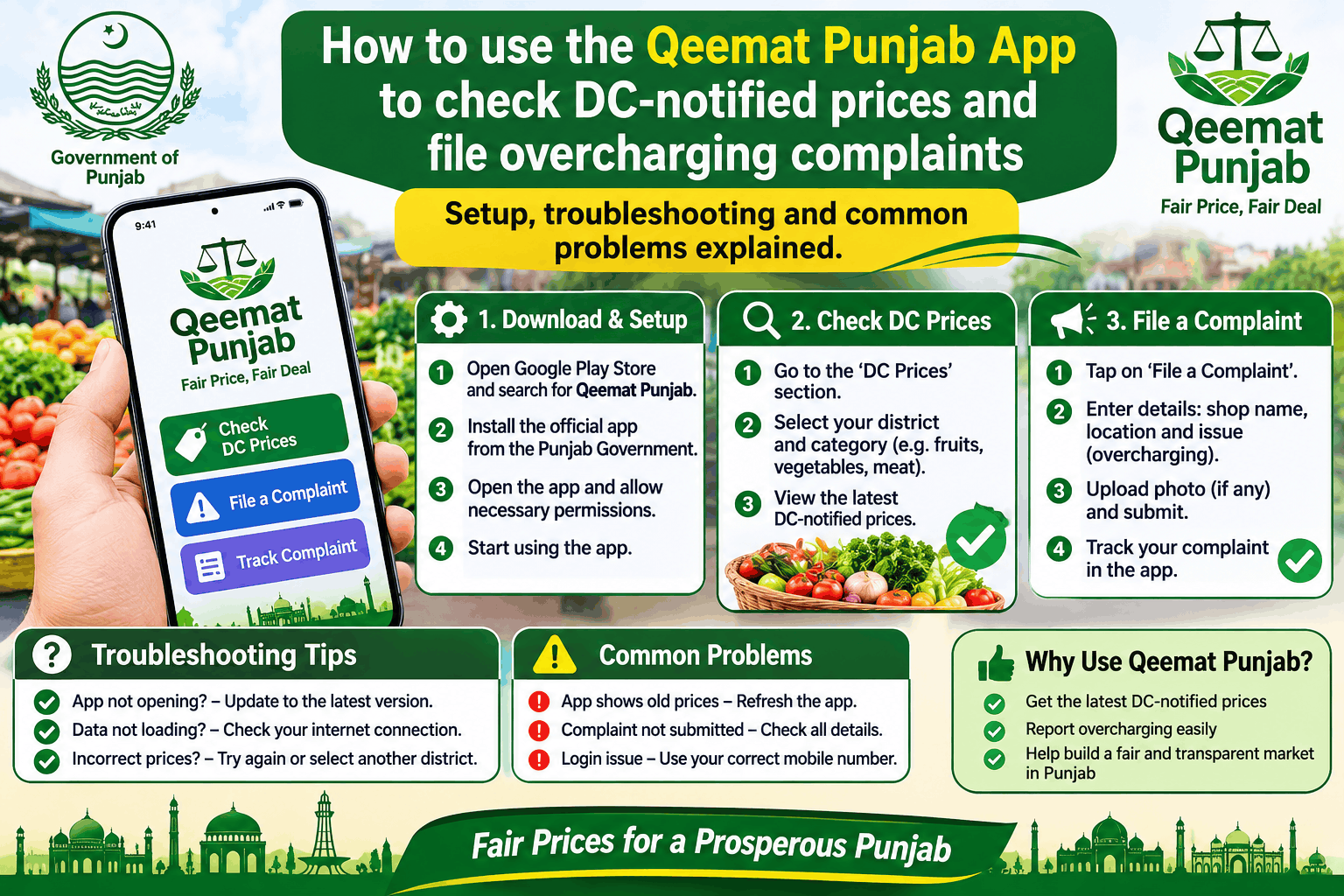
The app has two main functions. First, it shows you the daily notified prices for items like meat, vegetables, pulses, and other groceries, so you know what you should be paying . Second, it lets you file a complaint if a shop is overcharging. Because the app uses your phone’s location, the complaint is geo-tagged, which helps authorities identify the exact shop .
The system has been used extensively. As of March 2025, the government reported that 98% of overcharging complaints filed through the app had been resolved, with over 100,000 cases redressed .
How to Download and Set Up the App
The app is available on the Google Play Store. Here is how to get started.
Step 1: Download from the official source. Search for “Qeemat Punjab” on Google Play. The developer should be listed as Punjab Information Technology Board . The app is also available on APKPure, but the Play Store is the safest option .
Step 2: Install and open. The file size is around 8.4 MB, so it downloads quickly . The app requires Android 4.4 or later .
Step 3: Grant permissions. The app will ask for location access. This is necessary because the complaint system uses your location to identify the shop. It may also ask for camera and storage permissions for uploading photos .
Step 4: Choose your language. The app is available in both English and Urdu. You can switch between them in the settings .
How to Check Prices and File a Complaint
The core use of the app is straightforward.
To check prices: Open the app and browse the list of commodities. You will see the DC-notified rate for each item. The app also has a voice-enabled feature that lets you hear the prices, which is useful if you have difficulty reading .
To file a complaint: If a shop is charging more than the app’s price, tap the complaint option. The app will use your GPS location to identify the shop. You can describe the issue and submit it. You will be notified when the complaint is resolved .
Common Problems and How to Fix Them
The app has a rating of around 3.5 stars on Google Play, and user reviews reveal several common issues .
Problem: The app asks you to log in repeatedly or says “connect to internet” even when you have internet.
Some users have reported that after logging in, the app shows a “connect to internet” notification and then shuts down. This appears to be a bug in certain app versions .
What to try:
-
Update the app to the latest version from Google Play. The most recent version listed is 3.8.5.1, updated in December 2025 . An update may have fixed this issue.
-
Clear the app cache from your phone’s settings.
-
Uninstall and reinstall the app.
-
If the problem persists, it may be a server-side issue. Try again later.
Problem: Complaints are filed but no action is taken.
One reviewer complained that despite filing multiple complaints, no action was taken and the help center did not respond .
What to understand: The app routes complaints to the Price Control Magistrate, but the speed of action depends on the district administration. The government claims a 98% resolution rate overall , but individual experiences can vary. If a complaint is not resolved, you can also contact the district administration directly or use the Punjab Citizen Feedback Model (PCFM) if available in your district.
Problem: GPS location is not working in the complaint section.
If the app cannot fetch your location, you may not be able to file a geo-tagged complaint. One reviewer suggested that a manual location option should be added, but it is not clear if this has been implemented .
What to try:
-
Make sure location services are turned on on your phone.
-
Go outdoors or near a window to get a better GPS signal.
-
If the app still fails, try restarting your phone.
Problem: The app is slow or crashes.
What to try:
-
Check your internet connection.
-
Clear the app cache.
-
Ensure your phone has enough free storage.
A Note on the Sahulat Bazaar App
Do not confuse the Qeemat Punjab App with the Sahulat Bazaar app. Sahulat Bazaar is a separate government programme that runs physical markets and offers free home delivery of essential items through its own app . Qeemat Punjab is for price checking and complaints, not for shopping or delivery.
Frequently Asked Questions
Is the Qeemat Punjab App free?
Yes. The app is free to download and use. There is no fee for checking prices or filing complaints .
What is the Qeemat Punjab App used for?
It shows the DC-notified daily prices of fruits, vegetables, and essential commodities, and it allows you to file complaints against shops that overcharge .
How do I file a complaint on the Qeemat Punjab App?
Open the app, find the complaint option, and allow location access. The app will use your GPS to identify the shop, and you can describe the issue. You will be notified when it is resolved .
Is the Qeemat Punjab App available in Urdu?
Yes. The app is available in both English and Urdu, and it has a voice feature for checking prices .
Why is the Qeemat Punjab App not working?
Common issues include login problems, GPS failures, and crashes. Try updating the app to the latest version, clearing the cache, or reinstalling. If the problem continues, it may be a server issue .