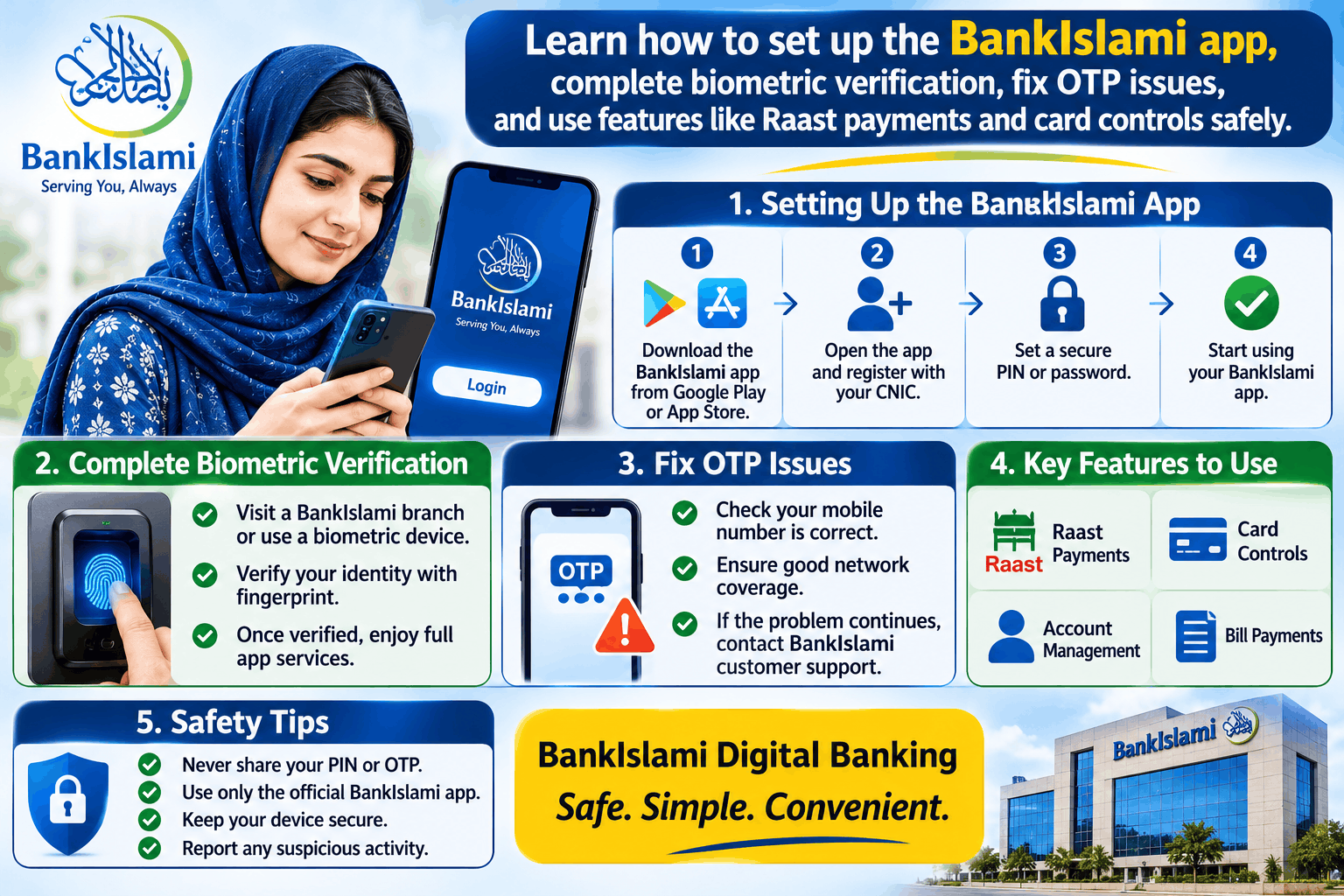
The BankIslami app is the official mobile banking application from BankIslami Pakistan Limited. It lets you check your balance, transfer money, pay bills, and manage your debit card from your phone . The app uses NADRA biometric verification for security, which means you need your CNIC and fingerprints to complete registration . This guide explains how to set it up, what to do when things go wrong, and how to use it safely.
What You Need Before You Start
Keep these things ready before you download the app.
-
Your CNIC number (for registration and biometric verification).
-
Your mobile phone with the SIM registered in your name.
-
Your BankIslami account details (if you are already a customer).
-
A stable internet connection (Wi-Fi or mobile data).
The app is available on both Google Play and the Apple App Store . Download only from these official stores.
How to Set Up the BankIslami App
The registration process has several steps. Follow them in order.
Step 1: Download and Open the App
Search for “BankIslami” on Google Play or the App Store. Look for the developer name “BANK ISLAMI PAKISTAN LIMITED” to make sure it is the official app . Install it and open it.
Step 2: Tap “Create Account”
On the welcome screen, select the option to create a new account. The app will ask you to enter your CNIC number .
Step 3: Verify Your OTP or Email
You will receive a One-Time Password (OTP) by SMS or email. Enter it in the app. If you do not receive the OTP, check your spam folder or follow the troubleshooting steps below.
Step 4: Create Your Username and Password
Choose a username and a strong password. After this step, there is a 2-hour cool-down period before you can proceed . This is a security measure, so plan your setup accordingly.
Step 5: Complete Biometric Verification
After the cool-down, log in with your new username and password. The app will ask you to complete NADRA verification. You will need to scan four fingers using the “Snap” button, then scan your thumbs . If your fingerprints are worn or you have a disability that makes scanning difficult, the app allows you to upload documents instead .
Step 6: Liveliness Check
The app will also ask you to take a picture of yourself and your CNIC (front and back). This confirms that you are the person named on the card .
Once these steps are complete, your app is ready to use.
Key Features of the BankIslami App
The app has been redesigned with new features for everyday banking .
-
Instant Fund Transfer: Send money to any bank account in Pakistan.
-
Raast P2M: Pay merchants directly using Raast, Pakistan’s instant payment system.
-
Bill Payments: Pay utility bills, mobile postpaid, and internet fees.
-
Mobile Top-Ups: Recharge your mobile balance.
-
Card Controls: Change your debit card PIN, deactivate your card, and turn domestic or international e-commerce on or off.
-
Transaction History: View your past card transactions.
-
Device Management: Set a primary or secondary device for account access.
-
Islamic Hub: Access Qibla direction, prayer times, Quran recitation, and Asma-ul-Husna .
-
Language Options: Switch between English and Urdu .
Common Problems and How to Fix Them
Problem: You Did Not Receive the OTP
This is the most common issue during setup. Try these steps.
-
Check your spam or blocked messages folder. OTPs sometimes end up there if your phone has marked the sender as spam .
-
Make sure your SIM is registered in your name. If the SIM is in someone else’s name, the bank’s system may not send the OTP. You can check by sending “MNP” to 8382 .
-
Restart your phone. A simple restart can fix temporary network issues.
-
Clear your messaging app cache. If your SMS inbox is full or the app is storing too much data, new messages may not arrive.
-
Wait and try again. Network congestion can delay OTPs by a few minutes.
If none of these work, call BankIslami’s helpline at 111-ISLAMI (475-264) .
Problem: Biometric Verification Fails
Fingerprint scans can fail if your fingers are dry, wet, or have worn ridges. Try wiping your fingers and the scanner area. If it still fails, use the document upload option in the app . You may also need to visit a BankIslami branch to update your biometrics with NADRA.
Problem: The App Crashes or Freezes
Make sure you have the latest version from the app store. Clear the app cache from your phone’s settings. If the problem continues, uninstall and reinstall the app.
Problem: You Forgot Your Username or Password
Use the “Forgot Password” option on the login screen. If that does not work, contact the bank’s phone banking team at 111-ISLAMI (475-264) for assistance .
Privacy and Scam Warnings
BankIslami has added security features to the app, including Mobile App Root Detection and advanced password protection . But you still need to protect yourself.
-
Never share your OTP, PIN, or password with anyone, even if they claim to be from the bank.
-
BankIslami will never call you and ask for your OTP. If someone does, hang up and call the official helpline.
-
Do not download the app from unofficial websites or links sent by strangers. Only use Google Play or the App Store.
-
Check your transaction history regularly. If you see something you do not recognise, report it immediately.
Frequently Asked Questions
Is the BankIslami app free to use?
Yes. The app itself is free to download and use. Normal banking charges may apply for certain transactions, but the app does not charge a separate fee.
Can I open a new account through the BankIslami app?
Yes. BankIslami also offers a fully digital Islamic banking solution called “aik” that allows you to open an account using your CNIC and biometric verification . The main BankIslami app is for existing account holders and new registrations.
Why is there a 2-hour wait after creating my username?
This is a security cool-down period designed to prevent fraud and give you time to confirm your details. You cannot skip it .
Does the BankIslami app work on both Android and iPhone?
Yes. The app is available for both Android (Google Play) and iOS (App Store) .
What is the BankIslami helpline number?
The official helpline is 111-ISLAMI (475-264). You can also use this number for complaints and queries .