The Telenor data check code is *999#. Dial this number from your Telenor SIM, press call, and the screen will show your remaining internet MBs . This is the fastest way to check your data balance without needing internet or an app. The service is not entirely free, though: Telenor charges Rs 0.20 + tax per attempt for most USSD balance checks . This guide explains the code, the charges, the app alternative, and what to do if the code does not work.
The Direct Answer: Dial *999#
If you only need the code, here it is.
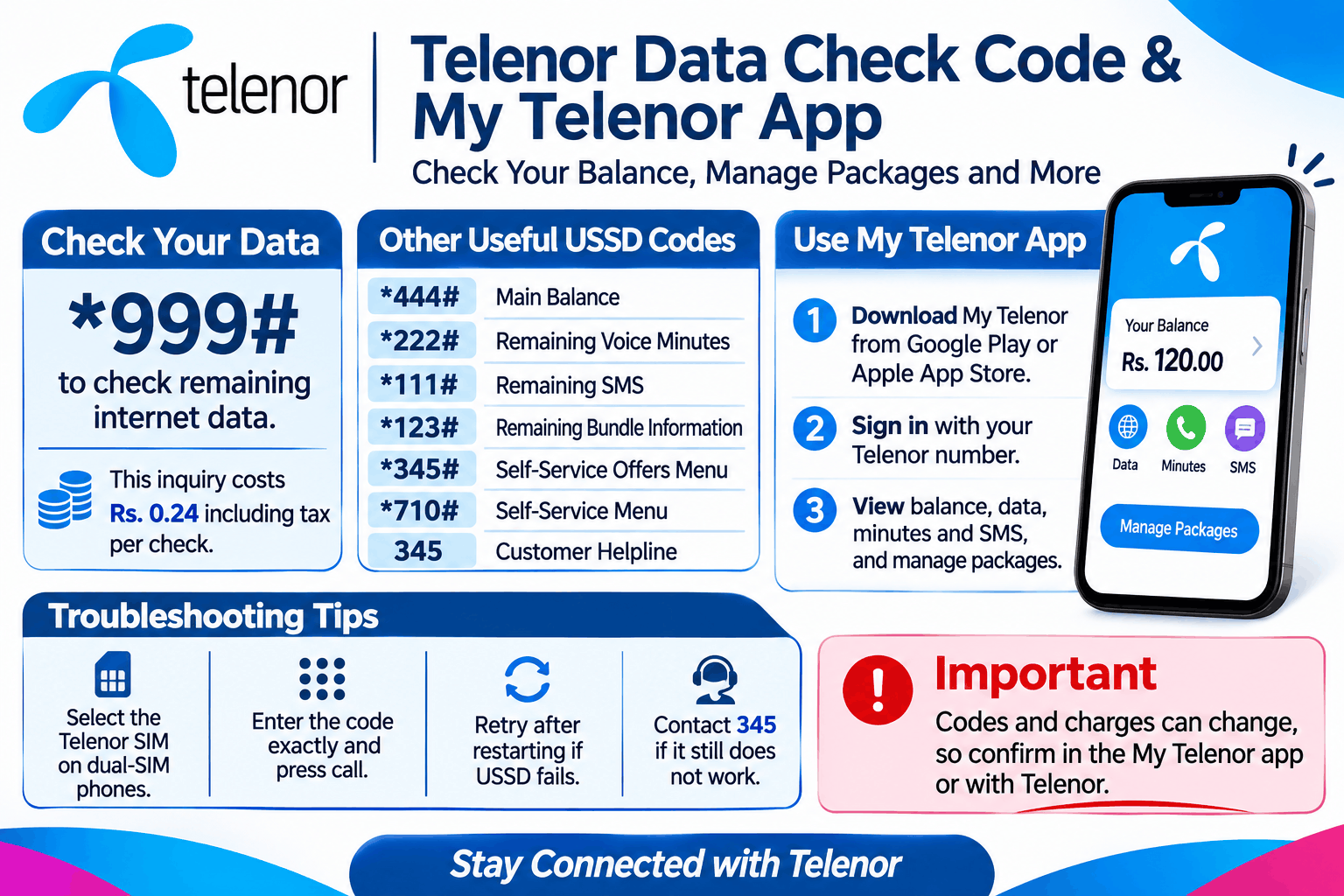
For remaining data: Dial *999# .
The reply appears on your screen within seconds. You do not need to open any app or have a data connection. It works on all Telenor prepaid and postpaid numbers.
A secondary code appears in some sources: *345#. One guide lists this as a way to check active data packages, remaining MBs, and package validity . The official Telenor pages consistently use *999# for the remaining MBs, so start with that.
What Other Codes Do You Need?
Telenor uses separate codes for different balances. This is useful to know, because dialling the wrong one will not give you the information you want.
| What you want to check | USSD Code | Charge (per attempt) |
|---|---|---|
| Remaining Data (MBs) | *999# | Rs 0.20 + tax |
| Remaining Voice Minutes | *222# | Rs 0.20 + tax |
| Remaining SMS | *111# | Rs 0.20 + tax |
| Mobile Balance (Prepaid) | *444# | Rs 0.20 + tax |
| All Free Resources | *123# | Free string |
*The 123# code is the most useful one to remember. Telenor describes it as a free string that shows the remaining balance of all free resources within an offer . If you are on a package with data, minutes, and SMS combined, this single code shows you the remaining amount of each. It is free, unlike the individual balance codes .
How to Use the My Telenor App Instead
The USSD code costs a small amount each time. If you check your data often, the My Telenor app is a better option.
The app is available on Google Play and the App Store. Telenor states that you can check your balance and bill for free through the app . It also shows your usage details and consumption history . You need a data connection to use the app, but if you are on Wi-Fi, the check costs nothing.
Step-by-step:
-
Download the My Telenor app from the official store.
-
Log in with your Telenor number. You will receive an OTP.
-
The home screen shows your balance and remaining resources.
-
Tap the data section to see your remaining MBs and package validity.
The app is the better long-term choice if you want to avoid the Rs 0.20 charge per USSD attempt.
Common Problems and What to Do
The code does not work or shows an error. Check that you are dialling *999# exactly, with no spaces or extra digits. If you are on a postpaid connection and the code fails, try the My Telenor app or call the helpline.
You are charged but get no reply. This can happen during network congestion. Wait a few minutes and try again. If it happens repeatedly, contact Telenor customer care.
The reply shows zero MBs but you have a package. The package may have expired, or the data may have been consumed by background apps. Check the validity date in the My Telenor app. If the package is still active, restart your phone and try again.
You are on a hybrid or combo package. Use *123# instead of *999#. The *123# code shows the remaining balance of all resources in the offer, including data, minutes, and SMS, and it is free .
Privacy and Scam Warnings
The USSD codes are safe because they run on Telenor’s own network. You are not sharing your details with a third party.
However, be careful of websites or apps that claim to check your Telenor balance. Only use the official My Telenor app or the USSD codes printed on Telenor’s own website. Do not enter your CNIC or Telenor password into any unofficial site.
Telenor will never call you and ask for your data balance or your OTP. If someone does, hang up.
Frequently Asked Questions
What is the Telenor data check code?
The code is *999#. Dial it from your Telenor SIM to see your remaining internet MBs . Telenor charges Rs 0.20 + tax per attempt .
Is the Telenor data check code free?
No. The individual balance codes (*999#, *222#, *111#, *444#) cost Rs 0.20 + tax per attempt . The code *123# is a free string that shows the remaining balance of all free resources in your offer . The My Telenor app is also free to use .
What is the code for Telenor balance?
Dial *444# to check your mobile balance (prepaid) or billing information (postpaid) .
How do I check my Telenor data without balance?
Use the My Telenor app on Wi-Fi. The app lets you check your balance and bill for free, without using your mobile data . Alternatively, dial *123#, which is a free string for checking all remaining offer resources .
Why is my Telenor data finishing so fast?
Check which apps are using data in the background. The My Telenor app shows your usage history . Also, check whether you have a package that is about to expire, or whether you are being charged out-of-bundle rates.